![Logo landing page 232x64 with border.png]](https://support.safetica.com/hs-fs/hubfs/Marketing/Safetica_logo_/Logo%20landing%20page%20232x64%20with%20border.png?width=145&height=40&name=Logo%20landing%20page%20232x64%20with%20border.png)
Product differences:
- ✨ Safetica Platform: A default password is used. We strongly recommend changing it as soon as possible. The console shows a notification dot on Settings and Safetica Client sections until a new password is set.
- 💻 Safetica On-Prem: The password is configured during server installation, so local management works from the start.
Introduction: What is the local admin password?
The local admin password controls who can perform protected actions directly on devices with Safetica Client, such as stopping or uninstalling the client, clearing the local database, or enabling debug mode. Without a valid password, these actions are blocked.
Every authorized action is recorded in Admin trail for auditing.
Permissions
✨ Safetica Platform: Only super admins can set or change the local admin password. Other admins can open the Safetica Client section but cannot modify the password.
💻 Safetica On-Prem: The first admin account created during onboarding.
How to set or change the local admin password
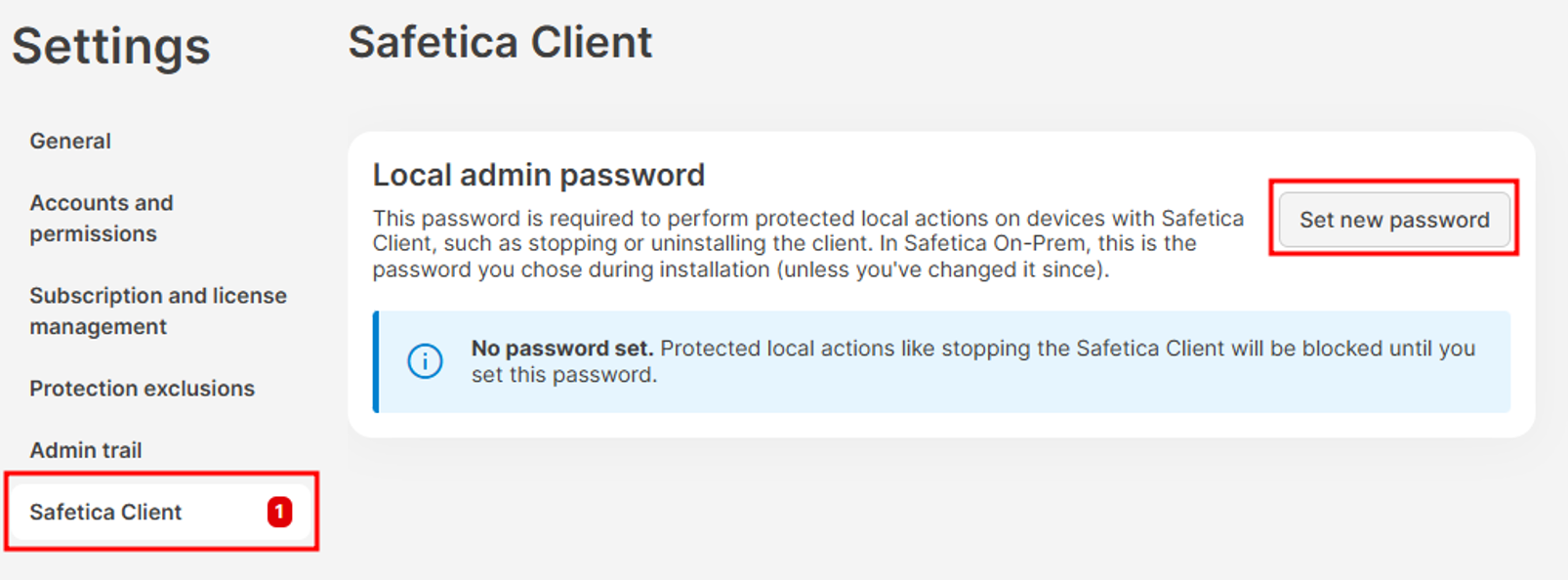
- Go to:
- ✨ Safetica Platform: Settings > Safetica settings > Safetica Client.
- 💻 Safetica On-Prem: Settings > Safetica Client.
- Click the Set new password button and enter a new password.
- Click Set new password.
✍️Safetica stores the password as a randomized hash and distributes it to all Safetica Client devices on the next sync.
Auditing local actions in Admin trail
Every authorized local admin action is recorded in Admin trail under the Endpoint Management account. Each entry includes:
- The date and time of the action
- The device on which it was performed
- The action performed on the device:
|
Action |
Description |
|
Stop |
Stop Safetica Client |
|
Uninstall |
Uninstall Safetica Client |
|
Reinstall |
Reinstall/update Safetica Client |
|
Connection |
Connection configuration changes |
|
Layer |
NetLayer driver install/uninstall |
|
Debug |
Debug/diagnostic features |
|
Clear |
Clear cache / logs from local database |
|
Dc |
Device Control install/uninstall |
|
Mapi |
MAPI add-in install/uninstall |
✍️Learn more about Admin trail here.
FAQ
Q: Who can set the local admin password?
A:
-
✨ Safetica Platform: Only a super admin. Other admins can view the Safetica Client section but cannot change the password.
-
💻 Safetica On-Prem: The first admin account created during onboarding.
Q: What happens on Safetica Platform if the password is not set?
A: A default password is used. We strongly recommend changing it as soon as possible. The console also shows a notification dot on Settings and Safetica Client sections.
Q: Where can I review the local actions performed on devices?
A: In Admin trail. Every authorized local action is recorded under the Endpoint Management account with details about the device, action, and timestamp.