![Logo landing page 232x64 with border.png]](https://support.safetica.com/hs-fs/hubfs/Marketing/Safetica_logo_/Logo%20landing%20page%20232x64%20with%20border.png?width=145&height=40&name=Logo%20landing%20page%20232x64%20with%20border.png)
Applies to: Safetica Platform | Safetica On-Prem
Devices running Safetica Client for Windows and Safetica Client for macOS; Safetica Management Service (On-Prem)
Summary
|
Topic |
Details |
|
What happened |
A critical out-of-bounds write (CVE-2026-111497) was disclosed in the open-source Google Brotli decompression library, versions 1.0.3 – 1.2.0. Safetica uses Brotli, directly and through third-party components, to decode web traffic and parse files. |
|
Why it matters |
The flaw is on the CISA Known Exploited Vulnerabilities list since 27 October 2026. Remote code execution has been demonstrated publicly in another product. Your vulnerability scanners may also flag Safetica components or the .NET runtime. |
|
Is it exploited against Safetica? |
There is no indication that the vulnerability is being exploited against Safetica. |
|
Potentially affected versions |
All versions of Safetica released before the fixed releases 11.47.12 and 11.44.21 (Safetica 11, 10, and older) |
|
Is Safetica's own code vulnerable? |
No. The vulnerable code is in third-party components (Brotli, .NET runtime, network filtering SDK, OpenText KeyView). We ship and use these components, so we are treating it as a Safetica vulnerability. |
|
Is it fixed? |
Yes. Feature release 11.47.12 (Platform: Feature release channel; On-Prem: via XML) and Cumulative hotfix 11.44.21 (On-Prem). Feature release 11.47.14 (Platform and On-Prem) also brings network monitoring and content classification back – on Platform even under Emergency deactivation. |
|
What you must do |
Safetica Platform: What to do depends on your current setup:
Safetica On-Prem:
Platform and On-Prem: On Windows, make sure the .NET 10 runtime is 10.0.14 or newer. See What you need to do below. |
|
If you cannot update |
|
What is currently happening
This section is updated as the situation develops. The most recent update appears first.
20 November 2026 · Feature release 11.47.14 (Platform and On-Prem)
Safetica Client 11.47.14 turns network monitoring and content classification back on.
- Safetica Platform: Just update your devices to 11.47.14 – nothing else to change. Devices on 11.47.14 ignore Emergency deactivation, so leave it on: it keeps devices not yet updated protected. Any admin who can edit settings can now apply Emergency deactivation.
- Safetica On-Prem:
- What changed: Devices on 11.47.13 or newer no longer follow Safetica Maintenance Console – they follow device settings in the Safetica console.
- Why you see new device settings: So that nothing turns back on without your decision, the server upgrade carries your deactivation over as Deactivate Network layer (all devices) and Deactivate Content analysis.
- What to do (if you turned the features off because of this vulnerability): turn these device settings off and update your devices to 11.47.14. Leave the deactivation in Safetica Maintenance Console on – it keeps devices on older versions protected.
For devices that stay on an older version and for the re-activation script, see Re-enabling after the update.
13 November 2026 · Fixed release published
Feature release 11.47.12 and Cumulative hotfix 11.44.21 contain all remediations listed below.
On Safetica Platform, you can turn on Emergency deactivation instead of updating.
Status of components where Safetica ships or uses the vulnerable Brotli decoder:
|
Component |
Platform |
Status |
|
Network monitoring (web traffic decoding) |
Windows |
Fixed (Brotli 1.2.1) |
|
Network filtering SDK (third-party) |
Windows |
Fixed (vendor update) |
|
.NET 10 runtime |
Windows (installed from Microsoft), macOS (bundled) |
Fixed in .NET 10.0.14. On Windows, install it from Microsoft (see step 3). |
|
OpenText KeyView (content classification) |
Windows, macOS |
Fixed (KeyView 26.4.4 with the vendor fix) |
5 November 2026 · Impact assessment complete, remediation in progress
We have identified every place where Safetica ships or uses the vulnerable Brotli decoder.
There is no indication that the vulnerability is being exploited against Safetica.
Safetica ONE 10:
-
Content classification is not affected (it uses a different technology).
-
Network monitoring is affected.
27 October 2026 · Added to CISA KEV
CISA added CVE-2026-111497 to its Known Exploited Vulnerabilities catalog. Public reporting describes remote code execution against a Node.js build and crashes in other products.
Safetica Platform: Emergency deactivation
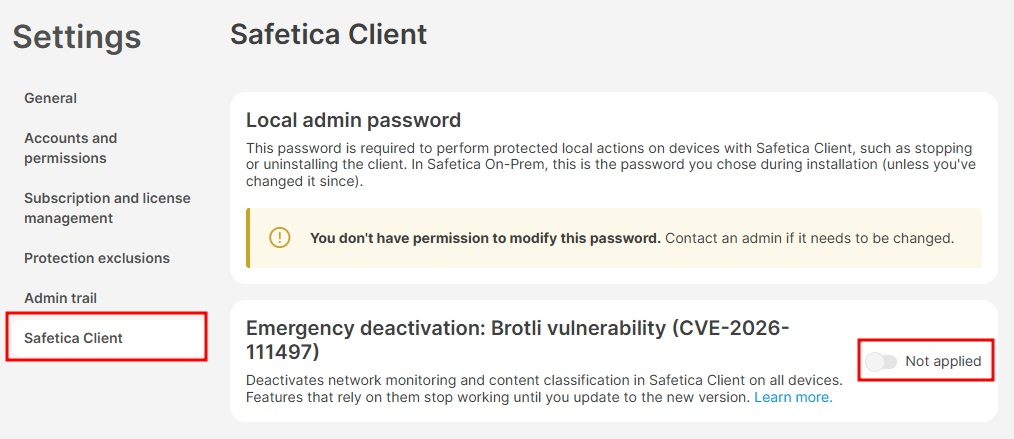
In Settings › Safetica settings › Safetica Client, apply Emergency deactivation: Brotli vulnerability (CVE-2026-111497) toggle. It turns off network monitoring and content classification in Safetica Client on all devices at once, with no update needed. Network DLP and content-based policies pause; device, application, destination and user-based policies keep working.
What to do depends on your current setup:
- Emergency deactivation is on: Switch to the Feature release channel in Devices › Settings › Release channel if you haven’t yet, accept 11.47.14 and update all devices to it, including devices already on 11.47.12 – with the switch on, they stay deactivated until they get 11.47.14. Each device runs fully again once updated. Leave Emergency deactivation on – you don’t need to turn it off.
- Emergency deactivation is off and all devices run 11.47.12 or newer: You’re protected. No action needed.
- Emergency deactivation is off and some devices run an older version: These devices are vulnerable. Update them as soon as possible – either finish the rollout of 11.47.12, or accept 11.47.14 and update to it (recommended). Both versions fix the vulnerability. If you can’t update quickly, apply Emergency deactivation in Settings › Safetica settings › Safetica Client to protect them in the meantime.
Couldn’t apply Emergency deactivation before? Now any admin who can edit settings can apply it or turn it off.
What you need to do
1. Check your current version
Check the Safetica Client version on your devices in the Safetica console. Versions older than Feature release 11.47.12 / Cumulative hotfix 11.44.21 are affected.
Safetica 10 and older:
-
Not affected by the classification (KeyView) issue, as a different technology was used.
-
Network monitoring is still affected.
2. Update to the fixed version
|
Safetica release |
Fixed from Safetica version |
Released |
|
Safetica Platform: Feature release (switch to the Feature release channel)
|
11.47.12 |
November 13, 2026 |
|
Recommended: 11.47.14 |
November 20, 2026 |
|
|
Safetica On-Prem: Cumulative hotfix release |
11.44.21 |
November 13, 2026 |
|
Safetica On-Prem: Feature release (via XML)
|
11.47.12 |
November 13, 2026 |
|
Recommended: 11.47.14 |
November 20, 2026 |
Safetica Platform: Switch to the Feature release channel and update Safetica Client to 11.47.14.
Safetica On-Prem:
- We recommend updating via the XML. Learn how to perform the update here.
- To update via the Universal Installer, run the installer, select Manual installation, and choose to install Safetica Management Service.
3. Update the .NET runtime on Windows
Safetica Client for Windows and Safetica Management Service (On-Prem) use the .NET 10 runtime installed from Microsoft. Make sure .NET 10.0.14 or newer is installed, via Windows Update / Microsoft Update or your patch-management tool. You can do this now, independently of the Safetica update. On macOS, the runtime is bundled and updated by the Safetica release.
4. If you cannot update
Safetica Platform: Apply Emergency deactivation (see Safetica Platform: Emergency deactivation above). It turns off the affected functions on all devices at once, with no update needed.
Safetica On-Prem: If you cannot deploy the fixed release in a reasonable time, we strongly recommend turning off Network layer and Content analysis for the whole tree in Safetica Maintenance Console (💻Safetica On-Prem: How to isolate the source of an issue in Safetica Maintenance Console) until you can update.
Re-enabling after the update
- Safetica Platform: You don’t need to turn Emergency deactivation off: devices on 11.47.14 ignore it.
- Safetica On-Prem:
-
- Devices on 11.47.13 or newer follow device settings in the Safetica console, not Safetica Maintenance Console. So that nothing turns back on without your decision, the upgrade to 11.47.14 carries your deactivation over as device settings Deactivate Network layer (all devices) and Deactivate Content analysis. If you deactivated the features because of this vulnerability, turn these device settings off.
- Devices on older versions keep following Safetica Maintenance Console. Leave the deactivation there on while any device runs a vulnerable version. Devices on 11.44.21 or 11.47.10–11.47.12 can be re-enabled there – only on devices that are already updated – or with the re-activation script.
For help, open a support ticket: https://support.safetica.com/en/knowledge-base/kb-tickets/new
Vulnerability overview
CVE-2026-111497 is an out-of-bounds write in the Google Brotli decoder, versions 1.0.3 – 1.2.0, fixed in 1.2.1. Processing crafted Brotli-compressed data can corrupt memory, which can lead to a crash or code execution in the process performing the decoding.
- CVE: CVE-2026-111497
- Severity (upstream): CVSS 9.2 (Google); 8.1 (Microsoft, for .NET)
- Known exploited: Yes, CISA KEV since 27 October 2026
- Exploited against Safetica: No indication
- Vulnerable component: Google Brotli 1.0.3 – 1.2.0; .NET runtime before 10.0.14
- Safetica code affected: No, third-party components only
- Affected deployments: Safetica On-Prem and Safetica Platform (devices)
What an attacker could achieve
Safetica has not confirmed exploitability in its products, but has released fixes to prevent it.
On Windows, network monitoring decodes compressed web responses in a service running with system privileges. A malicious or compromised website could therefore attempt to deliver crafted data to the device. In the worst case this could lead to code execution with system privileges; more likely outcomes are a crash of the monitoring service. For content classification, the attacker would need to place a crafted .parquet file (or archive on macOS) on the device.
References
- CISA – Known Exploited Vulnerabilities Catalog
- CVE Record: CVE-2026-111497
- Tenable FAQ – fixed versions incl. .NET 10.0.14
- Red Hat Bugzilla – CVE-2026-111497
- The Hacker News – Brotli decoder flaw behind Node.js RCE
Need help?
If you are unsure which version you are running, cannot update, or have questions about the impact on your environment:
- Open a support ticket
- Contact your Safetica partner