![Logo landing page 232x64 with border.png]](https://support.safetica.com/hs-fs/hubfs/Marketing/Safetica_logo_/Logo%20landing%20page%20232x64%20with%20border.png?width=145&height=40&name=Logo%20landing%20page%20232x64%20with%20border.png)
Product plans: Standard | Premium | Enterprise | On-Prem (see: Limits by plan)
Product differences:
-
In-cloud content analysis is not available in Safetica On-prem and Safetica Platform Standard.
-
Coming in Q3: The In-cloud content analysis package can be purchased as an add-on for all plans.
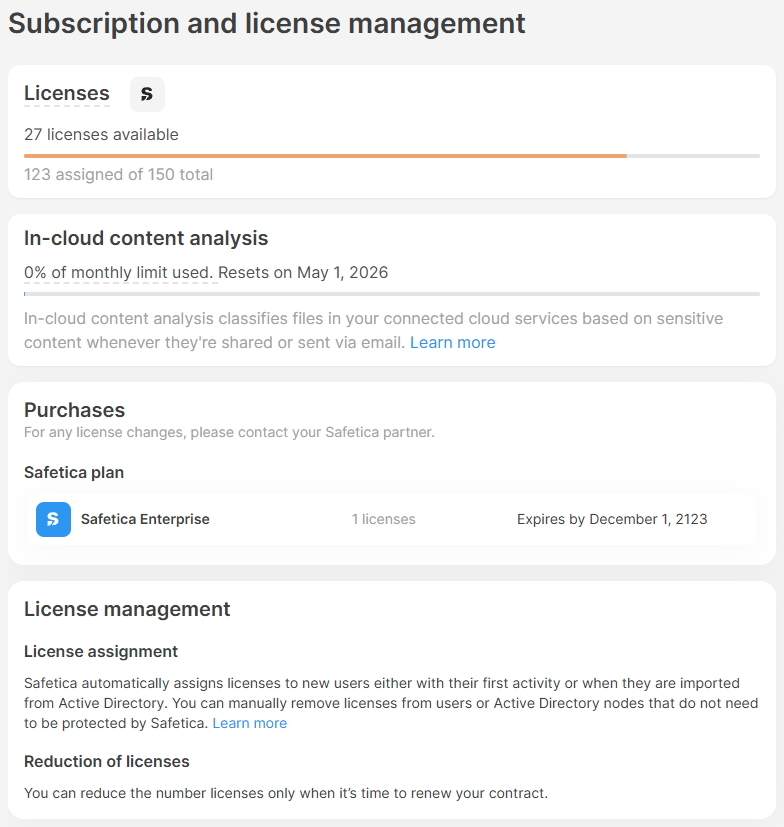
✨Safetica Platform: Go to Settings > Safetica settings > Subscription and license management
💻Safetica On-prem: Go to Settings > Subscription and license management
In Subscription and license management, you can see the details about your licenses, such as:
- How many licenses you purchased in total, how many are assigned to users, and how many are still available.
- How many in-cloud analyses you used, and how many you still have available.
- Check what types of licenses you purchased, how many, and when they expire (you can have multiple combinations with various expiration dates).
- Notifications about approaching expiration dates or too few licenses purchased.
✍️Learn how to remove and assign licenses to users here.