![Logo landing page 232x64 with border.png]](https://support.safetica.com/hs-fs/hubfs/Marketing/Safetica_logo_/Logo%20landing%20page%20232x64%20with%20border.png?width=145&height=40&name=Logo%20landing%20page%20232x64%20with%20border.png)
Why does Safetica use a browser extension?
The Safetica browser extension runs inside your browser and communicates directly with Safetica Client. This way, Safetica works with the real URL, page title, and typed text to audit and protect web activity more efficiently.
In Safetica version 11.43+, the extension is enabled by default for the whole company. Safetica Client installs it automatically from the Chrome Web Store and Microsoft Edge Add-ons, so users don't install or configure anything.
What problems does the browser extension solve:
- Protection on AI chat websites: Allows Safetica to check text prompts typed into AI chats before they're submitted and block anything that violates a policy.
- Better browser performance: Communicates directly with web pages, which reduces slowdowns that some users experience.
- Improved upload auditing: Correctly identifies where a file was uploaded, even when the user quickly switches tabs during the upload process.
- The browser extension receives upload information directly from the browser, so it identifies the upload destination faster and more accurately than the standard web detector.
Prerequisites
- Devices run Safetica Client 11.43+.
- Users browse with Google Chrome or Microsoft Edge (on Windows, the extension might also work for other chromium-based browsers).
Permissions
- Creating and editing device settings requires the Device management permission for the whole company.
- Admins with only the Device view permission see device settings and the Services table but cannot change them.
How the browser extension works
- Safetica Client installs the extension on each device. Users cannot remove it.
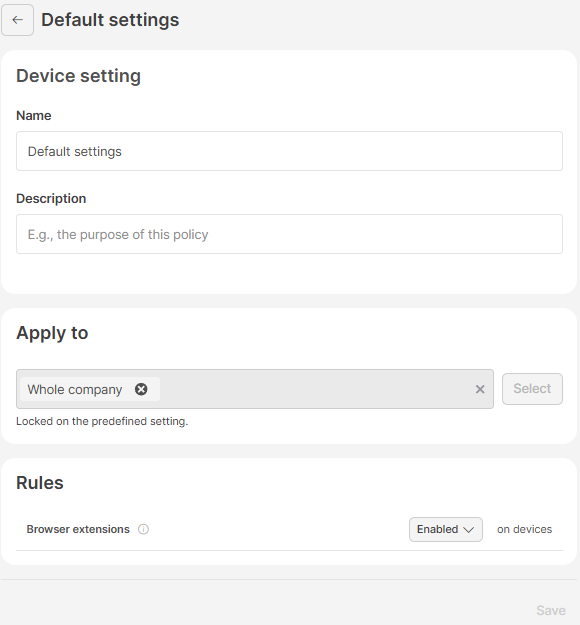
- In the predefined Default settings device setting, Browser extensions are Enabled for the whole company.
- The extension reports visited pages.
- The extension sends the text the user is about to submit on selected AI chat websites. Safetica Client evaluates this data against your policies.
- Each device reports the extension's state and version in the Services section in their device detail. Learn more here
- If the extension causes technical difficulties, disable it for the affected devices or the whole company with a device setting. Learn more here
How to check the browser extension status on a device
Check the status when you suspect the extension isn't running, or before you disable it.
- Go to Devices and click the device.
- In the detail, scroll to Services.
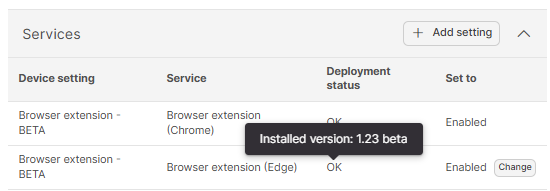
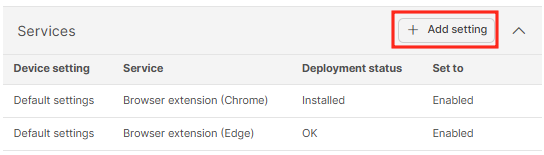
The Services table shows one row per browser extension:
- Device setting: The setting that applies to the device. Click Change to open it.
- Service: Browser extension (Chrome) and Browser extension (Edge) on Windows; a single Browser extension row on macOS.
- Deployment status: Whether the extension is installed and communicating. Hover over it to see the installed version. See detailed info about deployment statuses below.
- Set to: Whether the setting is enabled or disabled.
| Deployment status | Meaning |
|---|---|
| OK | Installed and communicates with Safetica Client. |
| Installed | Installed, but hasn't communicated yet (e.g., the browser hasn't been opened since installation). |
| Not installed | Not present in the browser, or Browser extensions is set to Disabled in the device setting. |
| Failed | Installed, but doesn't work (see the FAQ below). |
| Unknown | Safetica Client can't determine the state yet (e.g., the device hasn't evaluated its device settings). |
The extension updates independently of Safetica Client. Browsers update it from their store, so the installed version can differ between devices.
How to disable the browser extension for selected devices
Use this when the extension causes browser slowdowns, page errors, or conflicts with other extensions on specific devices.
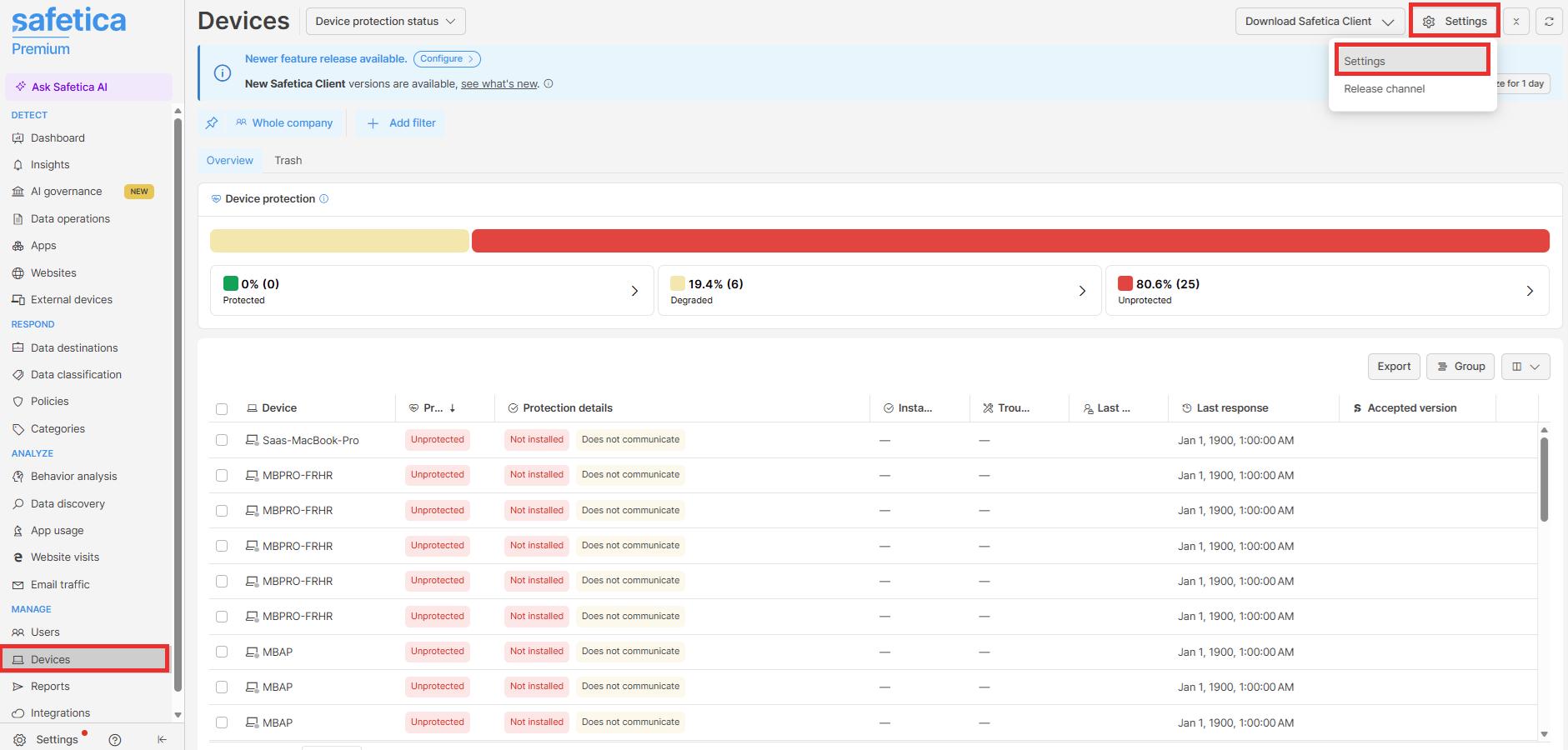
- Go to Devices, click Settings in the top right corner, and select Settings from the drop-down.
- Click Add setting.
- Enter a Name and optionally a Description.
- Under Apply to, select the devices or groups.
- Under Rules, set Browser extensions to Disabled.
- Click Save.
- A new setting is always placed to the top of the device setting list. You can then prioritize it by drag-and-dropping it to its correct position.
The order of device settings matters. They are prioritized from top to bottom. Safetica applies the first setting from the top that includes the device. Default settings always stays at the bottom and covers every device no other setting includes.
You can also add new device settings from the device detail - click Add setting in the Services table.
After the devices synchronize their settings:
- Safetica Client removes the extension from Chrome and Edge.
- The control of texts typed into AI chat websites stops working.
- On Windows, web audit continues through Safetica Client's built-in detection, without the extension's accuracy and performance benefits.
- In the device detail, Services shows your new setting with:
- Deployment status: Not installed
- Set to: Disabled
To enable the extension again, set Browser extensions to Enabled again or delete the setting.
How to disable the browser extension for the whole company
Use this when the extension causes problems across your environment. Default settings is the predefined base layer marked with a lock icon: you can change its rules, but you cannot move, disable, or delete it. Any setting above it in the list takes priority for the devices it covers.
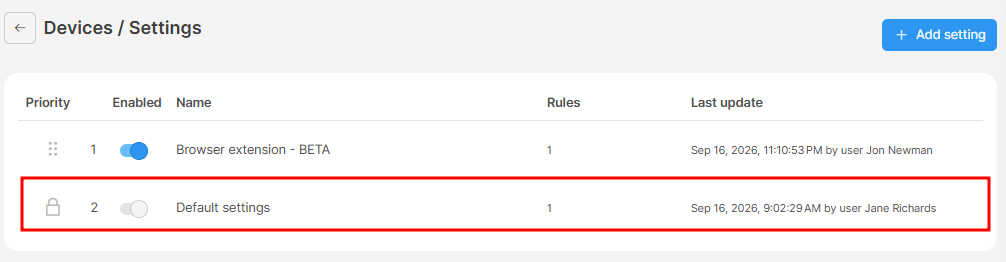
- Go to Devices, click Settings in the top right corner, and select Settings from the drop-down.
- Click Default settings.
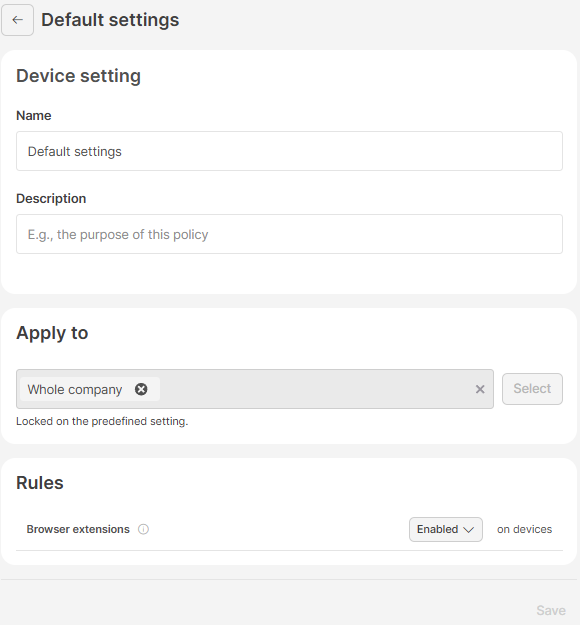
- Under Rules, set Browser extensions to Disabled.
- Click Save.
Safetica Client removes the extension from all devices that no other device setting covers. Devices covered by a higher-priority setting with Browser extensions set to Enabled keep it. To bring the extension back, set the rule to Enabled again.
FAQ
Q: Deployment status shows Failed on a Windows device. What should I do?
A: Failed means Safetica Client received no data from the installed extension during active browsing, or another browser policy conflicts with it (e.g., one that forces incognito mode). Check the browser policies you deploy through mobile device management (MDM) or Group Policy (GPO) for conflicts, and contact Safetica Support if the status persists.
Q: We deploy browser extensions through our own MDM (macOS) or GPO (Windows). Does Safetica interfere with it?
No, by default, Safetica Client installs its browser extension by writing to the browser's managed policies (managed preferences on macOS, policy registry entries on Windows). It keeps any extension entries your MDM profile or GPP already manages, so the two don't conflict.
One exception: If your own configuration profile or GPO force-installs the Safetica extension, contact Safetica Support and ask to switch the devices to externally managed installation. Safetica Client then leaves the extension installation entirely to your profile or GPO. Restart the macOS device after the switch.